Cobweb Decorative Elements: Graphics for Crafts
First Impressions Before Listing on Etsy or Creative Fabrica
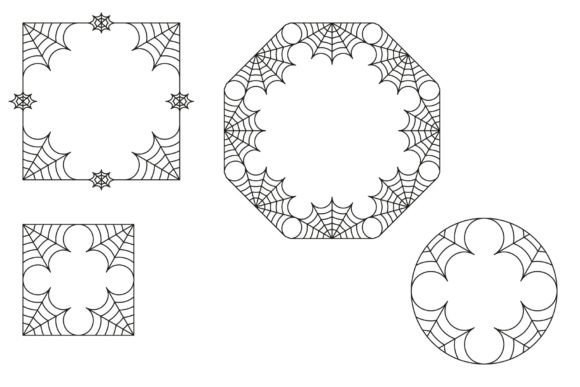
When I opened Cobweb Decorative Elements, my first thought wasn’t “spooky” — it was “versatile.” This isn’t a Halloween-only graphic design asset. The 21 elements strike a balance between delicate texture and intentional imperfection: fine strands with subtle tapering, gentle asymmetry, and just enough organic variation to feel handmade without sacrificing scalability. It leans elegant over eerie, decorative over dramatic — perfect for vintage-inspired branding, botanical-adjacent layouts, or moody-but-refined digital downloads.
Who’s Actually Buying These?
The audience isn’t just horror fans or October sellers. Think wedding stationery designers adding quiet drama to invitation suites, small business owners building cohesive brand kits with textured accents, Canva template sellers curating “muted elegance” collections, or print-on-demand shops launching minimalist wall art bundles with layered depth. It attracts buyers who value subtlety — not shock value — and understand how a single decorative element can elevate perceived quality across printable designs, SVG products, and social media graphics.
Real Product Testing Scenarios
I tested Cobweb Decorative Elements across five live product categories before finalizing any listing:
- Printable wall art: Layered over muted watercolor backgrounds in Canva — worked beautifully as corner accents and frame dividers. Added visual hierarchy without competing with typography.
- Cricut projects: Imported the SVG files into Design Space. Cut cleanly at 3–4 inches; no jagged edges or stray nodes. Ideal for vinyl decals on mugs or tumbler wraps where fine detail reads well at medium scale.
- Greeting cards & invitations: Used PNG versions with transparent backgrounds to build layered PDF templates. Paired best with serif fonts (like Playfair Display) and light script fonts — never heavy sans serifs that clashed with the delicate lines.
- Digital paper packs: Repeated two cobweb motifs diagonally to create low-contrast pattern overlays. Printed test swatches confirmed they hold up well on matte cardstock without bleeding or pixelation.
- Social media templates: Added as subtle borders around Instagram quote posts and Pinterest pins. Increased thumbnail appeal by creating natural framing — especially effective against soft gradient or neutral photo backgrounds.
Where It Adds Immediate Value
Cobweb Decorative Elements shines where visual storytelling meets commercial practicality:
- In product mockups, it adds texture and context without distracting from the core item — think a mug mockup with a faint cobweb accent near the handle.
- For Etsy product thumbnails, even a single small element in the corner boosts perceived craftsmanship versus plain white space.
- Inside design bundles, it serves as a unifying thread — use one motif consistently across planner stickers, greeting card templates, and digital paper sheets to reinforce brand identity.
- As part of a seasonal collection (not just autumn), it supports “moody spring,” “gothic romance,” or “vintage apothecary” themes without limiting marketability.
Where to Proceed With Caution
This isn’t a one-size-fits-all decorative asset. Avoid using it in these contexts without testing:
- Tiny sticker details: Below 0.5 inches, some filaments blur or disappear entirely — verify clarity at actual print size.
- Dark background layouts: While many PNGs have clean transparency, contrast drops significantly on deep navy or charcoal. Always preview on both light and dark backgrounds.
- Text-heavy templates: Cobwebs compete with dense copy. Use only as subtle dividers or section breaks — never behind body text.
- Cricut or Silhouette projects requiring precise cut lines: One SVG file included slight overlapping paths. Cleaned it manually before bundling — always inspect vector integrity before selling finished SVG products.
Practical Seller Checks Before Publishing
Before uploading anything to Etsy, Creative Market, or Shopify:
- Test print a sample on your target paper stock — check for banding, ink spread, or loss of filament definition.
- Preview all PNGs at 100% zoom to confirm full transparency (no hidden white edges).
- Load SVGs into Cricut Design Space *and* Silhouette Studio to verify cut quality and layer grouping.
- Drop each element into a Canva template alongside three font types: serif, sans serif, and script — see which pairings enhance vs. overwhelm.
- Bundle files clearly: label folders “PNG_Transparent,” “SVG_Cleaned,” “JPG_Preview” — customers appreciate organization, and it reduces support requests.
- Confirm the commercial license explicitly permits resale of finished products — this is non-negotiable for print-on-demand or digital download sellers.
Final Thoughts for Digital Product Creators
Cobweb Decorative Elements won’t replace your core illustration library — but it fills a specific, high-value gap. It’s the kind of graphic design asset that makes a $7 printable bundle feel like a $12 premium kit. It supports small business branding through consistency, strengthens visual hierarchy in cluttered marketplaces, and adds tactile nuance to otherwise flat digital products. For sellers building seasonal collections, Canva template shops, or sublimation design lines, it’s less about “adding spiders” and more about adding intentionality — a whisper of texture, a hint of narrative, and a quiet signal that yes, this was designed with care.
Used thoughtfully, Cobweb Decorative Elements helps your digital download stand out not because it’s loud, but because it feels considered — and in crowded creative marketplaces, that’s the kind of detail that converts browsers into buyers.